
2026 U.S. stock market holidays: Early closes, trading hours and order settings
Disclaimer: For educational purposes only, not investment advice. You are responsible for your investment decisions.
Hawai (Fxcns.com) is not liable for any resulting losses.
Before planning a U.S. stock trade, check three things: whether the market is closed or closing early, how the trading hours translate into Indian Standard Time (IST), and which sessions your order can trade in and when it expires. This guide covers the 2026 holiday and early-close schedules for the New York Stock Exchange (NYSE) and Nasdaq. Using Interactive Brokers (IBKR) as an example, it also explains why submitting an order successfully does not necessarily let you trade during the session you intended. India serves as the example, with conversion steps for readers in any time zone.
1. U.S. stock market holidays and early closes in 2026

The schedule below is based on the NYSE trading calendar and Nasdaq holiday schedule. All dates refer to the local date in U.S. Eastern Time (ET). A full-day closure means there is no regular trading session; an early close means regular trading takes place but ends sooner than usual. On both early-close dates listed below for 2026, regular trading ends at 13:00 ET. Check exchange and broker notices separately for pre-market and after-hours arrangements. Both 2026 early-close dates fall during Eastern Standard Time, so 13:00 ET corresponds to 23:30 IST on the same date.
- New Year's Day: Thursday, January 1 — closed all day.
- Martin Luther King Jr. Day: Monday, January 19 — closed all day.
- Washington's Birthday (Presidents' Day): Monday, February 16 — closed all day.
- Good Friday: Friday, April 3 — closed all day.
- Memorial Day: Monday, May 25 — closed all day.
- Juneteenth National Independence Day: Friday, June 19 — closed all day.
- Independence Day (observed): Friday, July 3 — closed all day.
- Labor Day: Monday, September 7 — closed all day.
- Thanksgiving Day: Thursday, November 26 — closed all day.
- Day after Thanksgiving: Friday, November 27 — early close at 13:00 ET.
- Christmas Eve: Thursday, December 24 — early close at 13:00 ET.
- Christmas Day: Friday, December 25 — closed all day.
2. Converting U.S. trading hours to India and other time zones
Once you have checked the trading date, look at that day's sessions. This example uses Indian Standard Time (IST), UTC+05:30, as shown by India's National Physical Laboratory. The regular, pre-market and after-hours sessions below apply to normal trading days, not holidays or early-close days. The extended-hours sessions use Nasdaq's published schedule as an example; brokers may offer different access hours and apply different eligibility requirements.
U.S. Eastern Time switches between daylight saving time and standard time. The corresponding trading hours in India therefore shift by one hour when the U.S. clocks change. According to the National Institute of Standards and Technology (NIST) explanation of daylight saving time, U.S. daylight saving time begins on the second Sunday in March and ends on the first Sunday in November. In 2026, it starts on March 8 and ends on November 1; standard time applies for the rest of the year.
In the schedules below, “the next day” is relative to the U.S. Eastern trading date. For example, Monday's after-hours session in the U.S. takes place early Tuesday morning in India.
U.S. daylight saving time: March 8–November 1, 2026
- Regular session: 19:00–01:30 the next day IST (09:30–16:00 ET)
- Pre-market session: 13:30–19:00 IST (04:00–09:30 ET)
- After-hours session: 01:30–05:30 the next day IST (16:00–20:00 ET)
U.S. standard time (sometimes called winter time)
- Regular session: 20:00–02:30 the next day IST (09:30–16:00 ET)
- Pre-market session: 14:30–20:00 IST (04:00–09:30 ET)
- After-hours session: 02:30–06:30 the next day IST (16:00–20:00 ET)
How to convert the schedule to your own time zone
First, find the UTC offsets for New York and your location at the time of the trade. UTC stands for Coordinated Universal Time. NIST's time-zone table lists Eastern Daylight Time (EDT) as UTC−04:00 and Eastern Standard Time (EST) as UTC−05:00. Use this formula: local time = Eastern Time + (your local UTC offset − the Eastern UTC offset).
For India at UTC+05:30, add 9 hours 30 minutes during U.S. daylight saving time or 10 hours 30 minutes during U.S. standard time. The 09:30 ET market open therefore becomes 19:00 IST or 20:00 IST, respectively. For another location, replace UTC+05:30 in the calculation with that location's offset at the time of the trade.
If the calculation crosses midnight, move the date forward or back as needed. The two locations may change their clocks on different dates, so do not assume the time difference stays the same all year. In a time-zone converter, enter the actual trading date and select New York (America/New_York) and your destination city; for India, select Kolkata (Asia/Kolkata).
3. How order settings affect when you can trade
Knowing when the market is open is only the first step: your order must also be eligible to trade during that session. Keep three settings distinct. The trading session determines when an order can participate, its time in force determines how long it remains valid, and its order type determines the execution conditions. The screenshot and examples below use U.S. stock orders in IBKR's Trader Workstation (TWS). Available settings vary by product, order type and platform version; other brokers may use different names and rules.
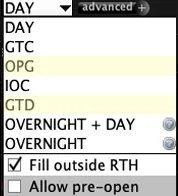
Which sessions can your order trade in?
In the screenshot above, time-in-force options such as DAY and GTC appear in the same menu as trading-session settings. They serve different purposes. Start with the trading sessions, which can be understood in four groups:
- Regular trading hours (RTH) only: The order can execute only during the regular session, not in pre-market or after-hours trading.
- Regular hours plus pre-market and after-hours trading: For supported products and order types, select “Fill outside RTH” in the screenshot. IBKR's official instructions explain that this setting allows an order to participate in supported pre-market and after-hours sessions as well as regular trading hours.
- Overnight only: “OVERNIGHT” in the screenshot refers to the overnight session. You must select overnight trading separately; permission to trade in pre-market and after-hours sessions does not automatically include it. According to IBKR's U.S. overnight trading guide, eligible stocks and ETFs can trade overnight from 20:00 to 03:50 ET the next day. Check the applicable trading dates and holiday arrangements separately.
- Overnight trading through the following day: The “OVERNIGHT + DAY” option in the screenshot allows orders that remain unfilled overnight to continue trading the following day. The IBKR TWS order guide describes the combination of overnight trading and SMART routing: under the normal trading schedule, an order can resume trading at 04:00 ET the next day and participate in pre-market, regular and after-hours sessions until 20:00 ET that day at the latest. The overnight session ends at 03:50, followed by a 10-minute break before trading resumes at 04:00. These orders do not remain open across successive trading days like GTC orders. Check holiday and early-close arrangements separately.
How long does an order remain valid, and what determines execution?
Next, consider time in force. DAY means the order is valid for the day. Under IBKR's TWS guidance on DAY orders, a DAY order restricted to regular hours is valid only during the regular session of its applicable trading day. Any unfilled quantity is cancelled after trading ends that day; the order does not last for 24 hours from submission. GTC means “good till cancelled” and allows an order to remain open across trading days until it fills, is cancelled or expires under the broker's rules. However, IBKR also specifies conditions under which GTC orders are automatically cancelled, so GTC does not mean an order remains valid indefinitely. Selecting GTC does not automatically enable pre-market or after-hours execution; check the session settings separately.
Order type determines the conditions for execution. As IBKR's limit order guide explains, a buy limit order cannot execute above your specified price, and a sell limit order cannot execute below it. Even with the correct session selected, price, available liquidity or queue position may prevent a fill or result in only a partial fill. A quote reaching your limit price does not guarantee execution.
Two common reasons for missing a trade
First, suppose you want to buy a stock after hours but forget to select “Fill outside RTH” when submitting a limit order in TWS. Even if the after-hours price briefly meets your limit, an order restricted to regular hours will not participate. If the order is still valid, it must wait until the next eligible session for a chance to execute, by which time the price may have changed.
Second, you assume a DAY order will remain active until 16:00 ET but overlook an early close. On the two 2026 early-close dates listed in Section 1, regular trading ends at 13:00. For a DAY order restricted to regular hours, the execution window therefore ends at 13:00. Any unfilled quantity does not automatically carry over into the after-hours session. Check the order's displayed status to see whether it has been cancelled. If you want an order to remain open across trading days, check both its time in force and its permitted sessions.
4. What to check before and after submitting an order
Before submitting an order, check the trading date, the corresponding local time and the order settings, in that order. First confirm whether the market is closed or closing early, then convert your intended trading session to your local time using the method above. Finally, check whether the order can execute during that session, when it expires, and whether its limit price and other conditions match your plan.
After submission, check whether the order is awaiting activation, working, partially filled, fully filled, cancelled or expired. A successful submission does not mean the order is participating in the current session, let alone that it has executed.
A market holiday calendar helps you plan when to trade; it does not predict whether prices will rise or fall. The exchange calendars, daylight saving rules and IBKR order documentation cited here were checked on September 26, 2026. Exchange and broker arrangements may change, so review the latest notices before trading. If you have questions about the trading hours or order settings discussed here, feel free to ask in the group.