US stock order types explained: market vs limit vs stop orders
Disclaimer: For educational purposes only, not investment advice. You are responsible for your investment decisions.
Why can an order remain unfilled after you set a price? And why might a $95 stop result in a sale at $90?
The key distinction is this: The price you enter may be a limit on the execution price, or simply a trigger that activates an order. These serve different purposes.
A limit defines the prices you will accept; a trigger determines when an order starts working under its specified rules. Meeting the trigger conditions does not mean the order has filled, and does not guarantee execution at the trigger price.
We will use a series of hypothetical prices to explain these orders for investors buying and holding US stocks. All figures are illustrative, not actual market data. Profit and loss calculations exclude commissions, taxes, and other costs.
1. Market and limit orders: decide what matters most
Suppose a stock last traded at $100 and you want to buy 100 shares.
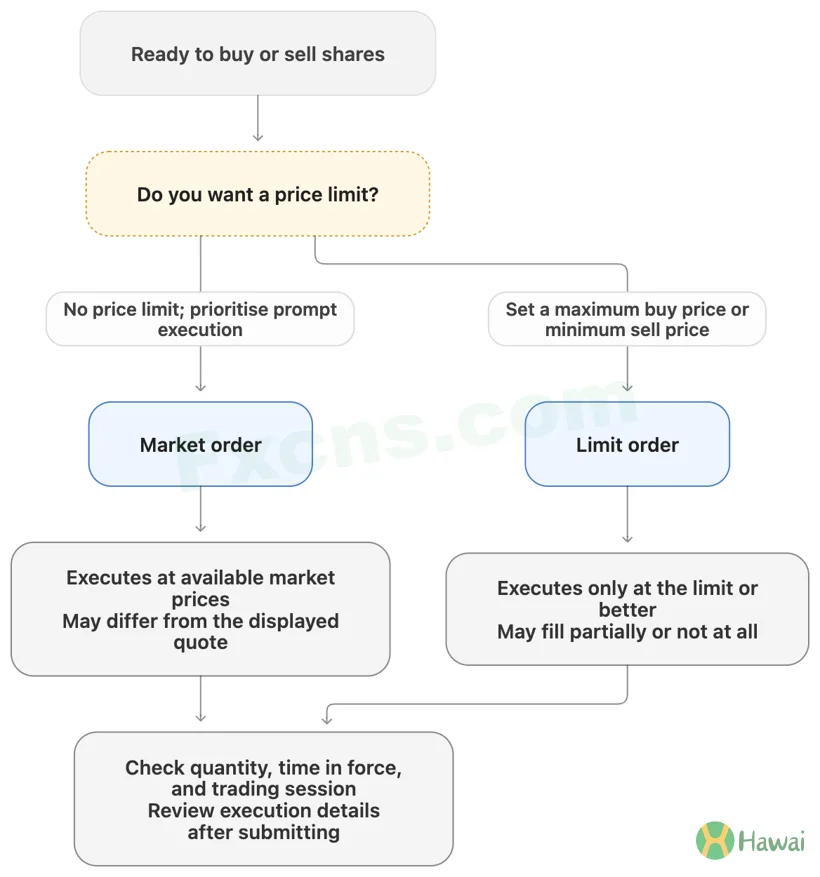
Your first decision is whether you want to buy promptly or refuse to pay above a particular price.
Market orders: execute at available prices without a limit
A market order does not set a maximum purchase price or minimum sale price. It executes at prices available in the market.
The $100 on your screen is only the last traded price. It does not mean anyone is still offering to sell to you at that price.
Suppose the shares available to buy when your order executes are:
- 40 shares at $100;
- 60 shares at $100.10.
If your market order for 100 shares fills against those sell orders in sequence, the total cost is:
40 × $100 + 60 × $100.10 = $10,006.
The average execution price is $100.06, rather than the $100 originally displayed. The difference between the expected and actual execution price is commonly called slippage.
Market orders usually execute quickly, but that does not mean they always fill immediately and in full. Trading halts and insufficient liquidity can still affect execution. The SEC’s guide to order types also notes that a market order can fill in portions at different prices.
Limit orders: control the price, but accept that the order may not fill
A limit order defines the prices you will accept:
- A buy limit order can fill only at the limit price or lower.
- A sell limit order can fill only at the limit price or higher.
A limit order to buy 100 shares at $100 will not accept an execution price of $100.10.
Using the same offers, suppose only 40 shares are available to fill your order at $100. You might buy those 40 shares while the remaining 60 wait. If other traders execute first, you might receive fewer shares.
In other words, a limit is not an instruction that guarantees a trade at that exact price. It sets a boundary against a worse price.
Even if the market traded at $100, there may not be enough shares left to fill your order when it reaches the front of the queue. Vanguard’s guide to stock order types likewise distinguishes a price limit from a guarantee of execution.
If you refuse to pay more than $100, a limit order expresses that requirement, at the cost of possibly not buying. If prompt execution matters more, you must accept the price uncertainty of a market order.
2. Stop-market and stop-limit orders: why a trigger is not an execution price
Suppose you bought 100 shares at $100 each and want to start exiting if the stock falls to $95.
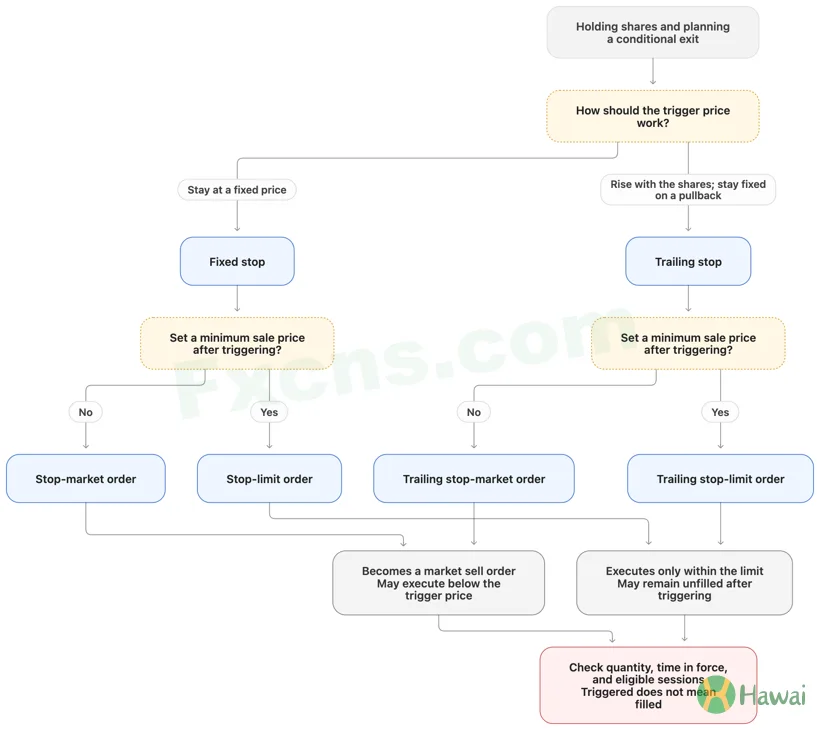
There are two separate questions:
- What conditions should start the sale?
- Once activated, how should the order execute?
The $95 trigger can answer the first question, but cannot determine the second on its own.
Stop-market orders: become market orders when triggered
A standard stop order, also called a stop-loss order, becomes a market order when triggered. We call it a “stop-market order” here to distinguish it from a stop-limit order.
Setting a sell stop at $95 means:
When the broker’s trigger conditions are met, activate a market sell order. It does not require the broker to sell at $95.
Suppose the stock gaps from $96 to $90 and meets the trigger conditions during a session in which the order is active. It then becomes a market order and may execute near $90 or at another available price.
If all 100 shares ultimately sell at $90, the loss is:
($100 − $90) × 100 = $1,000.
That is not the $500 loss you estimated using the $95 stop price.
The crucial point is that $95 is the trigger that starts the sale, not a promised execution price. Actual execution depends on the prices and quantities of buy orders available at that time.
Stop-limit orders: the limit still has to be met after triggering
A stop-limit order specifies two prices. For example:
- Stop price: $95;
- Sell limit price: $94.
Once triggered, the order becomes a sell limit order at $94, accepting only $94 or higher.
If the stock gaps to $90 and stays below $94, the order may remain unfilled even though it has triggered. You still own the shares, and the price could fall further.
A later recovery into an executable price range may allow the order to fill. Whether it fills in full still depends on available buying interest and other conditions.
The two stop types leave you with different uncertainties
Remember the distinction this way:
- Stop-market: no sale price limit after triggering, but execution may be well below the trigger price.
- Stop-limit: a minimum sale price, but you may not be able to exit.
The SEC’s explanation of stop orders distinguishes these outcomes and notes that brokers may use last-sale prices or quotes to determine whether a stop has triggered.
A chart showing a low below $95 is therefore not enough to conclude that your shares should already have sold. You also need to know the order’s eligible sessions, trigger criteria, and execution method after triggering.
3. Trailing stops: the trigger moves, but execution is not guaranteed at that price
A fixed stop price stays unchanged. A trailing stop adjusts its trigger as the market moves in your favour.
We will continue with the example of an investor holding shares and preparing to sell.
Follow a 10% trail through a rise and a pullback
Suppose the stock is currently at $100 and you set a 10% trailing sell stop. For illustration, assume the reference price used to calculate the trailing stop changes as follows:
- At a reference price of $100, the trigger is $90;
- As it rises to $110, the trigger rises to $99;
- As it rises further to $120, the trigger rises to $108;
- When it pulls back to $115, the trigger stays at $108 rather than moving down.
The trigger therefore rises as the shares advance, but stays at its previous level when they fall.
The reference price, initial stop calculation, and trigger criteria depend on the broker’s order rules.
A trigger of $108 does not guarantee a sale at $108 or higher
With a trailing stop-market order, meeting the $108 trigger conditions still activates a market sale.
Suppose the price gaps to $103 and the order fills at $103. Against your $100 purchase price, the profit is $3 per share, rather than the $8 calculated using a $108 exit.
A larger gap could even produce an execution below your purchase price. A trigger above your cost therefore does not establish that the trade can no longer lose money.
With a trailing stop-limit order, the limit conditions must still be met after triggering, so the order may not fill. The SEC’s trailing stop explanation also describes trailing mechanisms for both stop and stop-limit orders.
Choosing the trail involves a trade-off: a tighter trail is more easily triggered by a short-term pullback, while a wider trail may give back more of the advance before you exit. No single percentage suits every stock and holding period.
4. Taking profit: choose the execution method after setting your goal
“Taking profit” describes why you want to sell, but does not fully specify how the order executes.
Suppose you bought at $100 and plan to sell when the stock reaches $120. You could place a sell limit order at $120.
That instruction means:
Accept a sale at $120 or higher, but not below it.
The stock trading at $120 does not guarantee that all your shares have sold. If they all execute at $120, the price gain is $20 per share, or 20% of the $100 purchase price, before costs.
Fixed targets and trailing exits serve different holding plans
If you are happy to sell at $120, you can use a sell limit order with that fixed target.
If you want to keep holding while the shares rise and exit after a specified pullback, you could consider a trailing stop. You must accept giving back some gains and uncertainty over the execution price.
A fixed target may take you out before further gains, while a trailing exit will not preserve all the unrealised profit near the peak. Choose according to your exit plan, rather than how sophisticated an order name sounds.
Coordinate profit-taking and stop-loss orders
Suppose you hold 100 shares and want to:
- Take profit with a sell limit at $120;
- Trigger a stop-loss sale at $95.
Placing two separate sell orders for 100 shares each does not mean one will automatically disappear when the other fills. Orders that are not linked may remain active.
Interactive Brokers’ exit strategy guide describes profit takers, stop losses, and bracket orders. Its OCA order guide explains how linked orders can be cancelled or adjusted when another order fills.
Check how the orders are linked and how partial fills affect the remaining orders. After manually selling or reducing a position, also check for outstanding exit orders.
5. The right order type also needs the right timing settings
An order involves at least three separate settings:
- Order type: how it executes;
- Time in force: how long it remains active;
- Trading session: when it may execute or trigger.
Choosing a limit order does not keep it active indefinitely. Choosing a long validity period does not automatically make it eligible for pre-market, after-hours, or overnight trading.
Day and GTC determine how long the order lasts
A Day order generally lasts for the applicable trading day. The unfilled portion usually expires at the end of that day rather than carrying over automatically to the next.
GTC means Good-Til-Canceled, but should not be read as “never expires.” A broker may impose a maximum duration or automatic cancellation conditions. The SEC’s explanation of time-in-force instructions notes that these limits can vary by broker.
For example, you place a $100 limit buy order that does not fill that day. If it has expired, a fall to $100 the next day will not reactivate it.
Time in force and trading sessions are separate
Suppose you enter a GTC stop order that triggers only during regular trading hours. An after-hours price below the stop does not mean the order will activate in that session.
A broker offering extended-hours trading does not make every order type available in those sessions. Support for order types and instructions varies, so the specific order rules matter.
If you plan to hold into after-hours or overnight trading, establish the following:
Is this order active in that session? Which prices determine whether it triggers? Can the resulting order type execute during that session?
Those answers matter more than simply seeing a stop price entered on the screen.
6. Submitted, triggered, and filled are different states
After submitting an order, check more than the price you entered. Check its status:
- Submitted or accepted: does not mean filled; a conditional order may still be waiting to trigger.
- Triggered: the specified execution process has started, but the shares have not necessarily been bought or sold.
- Partially filled: only some shares have traded; check whether the remainder is still active.
- Fully filled: use the execution details to confirm the final quantity and prices.
For example, a stop-limit sell order for 100 shares triggers but fills only 40. You still hold 60 shares. A “triggered” status does not mean you have exited the entire position.
Confirm the outcome after modifying or cancelling an order too. A cancellation request is not confirmation of cancellation; the original order may still fill before cancellation is confirmed. IBKR’s order status documentation likewise distinguishes a pending cancellation from a completed fill.
7. Choose an order by stating your requirement in one sentence
First, describe what you actually want to do:
- “I want to buy or sell promptly and can accept price changes.” — Consider a market order.
- “I will not buy above this price or sell below it, even if that means no trade.” — Consider a limit order.
- “I want to start exiting after a downside trigger and can accept execution below that trigger.” — Consider a stop-market order.
- “I want to sell after a downside trigger, but not below my minimum price—even if I cannot exit.” — Consider a stop-limit order.
- “I want the exit trigger to rise with the stock, then activate after a specified pullback.” — Consider a trailing stop, and distinguish market from limit execution after triggering.
Then specify the quantity, time in force, and eligible trading sessions to complete the instruction.
The trigger determines when execution starts, the limit defines acceptable prices, and execution details show what actually traded. A loss estimate based on a stop price can help you size a position, but it is not an absolute cap on the loss you may incur.