IBKR Adaptive vs MidPrice: how the orders work and when to use them
Disclaimer: For educational purposes only, not investment advice. You are responsible for your investment decisions.
When buying stocks, you may hesitate to use a market order for fear of overpaying, yet find yourself constantly watching quotes and adjusting a limit order.
Interactive Brokers’ Adaptive and MidPrice can help seek execution opportunities, but they work differently:
- Adaptive: specify how much you will pay and how urgently you want to buy, then let the algorithm seek a fill. You can also omit the limit, but that removes a price constraint.
- MidPrice: seeks execution around the current bid-ask midpoint. Set a Price Cap if you do not want your purchase price to keep rising with the market.
Neither guarantees a cheaper purchase than a standard order every time. The questions that matter are: what happens when quotes change, when can the order fill, and when will it keep waiting?
We will use the same hypothetical quotes throughout. The figures explain the mechanics, not actual market conditions or a guaranteed sequence of algorithmic actions. All amounts exclude commissions, exchange fees, and other costs.
1. Understanding the quote: how can a trade occur between $100 and $100.10?
Suppose you want to buy 100 shares of a US stock, with the following current quotes:
- Best bid: $100—the highest price buyers are currently quoting;
- Best ask: $100.10—the lowest price sellers are currently quoting;
- Bid-ask spread: $0.10;
- Midpoint: $100.05.
The midpoint is calculated as:
($100 + $100.10) ÷ 2 = $100.05.
Here we use the National Best Bid and Offer, or NBBO, rather than the quotes from just one trading venue.
If you accept the seller’s $100.10 ask, you may buy at that price, assuming the quote stays unchanged, sufficient shares are available, and no other orders execute first.
If you will pay only $100, you can place a limit buy order and wait for a seller to accept.
Could you instead trade between those prices, at $100.05?
Possibly, but another party must be willing to trade with you there. Some trading interest is not displayed in public quotes, or may appear only after you submit your order.
The midpoint is a calculated reference price. It does not mean 100 shares are already waiting to be sold to you there.
Adaptive and MidPrice try to find these opportunities, but cannot create a willing seller out of nothing.
2. What does an algorithm add to a standard limit order?
Standard limit orders: your price stays fixed unless you change it
A limit order to buy 100 shares at $100.05 means:
Buy at $100.05 or lower, but not above it.
The order may fill if someone is willing to sell; otherwise, it waits.
Suppose it has not filled when quotes change to:
- Bid: $100.10;
- Ask: $100.20;
- Midpoint: $100.15.
Your limit stays at $100.05. It does not automatically rise to $100.15.
To raise your bid, you must modify the order. If you do not want to chase the market, leave the price unchanged.
A $100.10 limit does not mean you must pay $100.10
A buy limit of $100.10 is simply your maximum acceptable price. A standard limit order can also fill lower if a better opportunity is available.
It is therefore wrong to assume:
A standard limit order always fills at $100.10, while an algorithm always fills at $100.05.
The difference is how execution opportunities are sought and handled, not that one always costs more and the other always costs less.
We will first look at Adaptive, then explain why MidPrice follows changes in the midpoint.
3. Adaptive: set your maximum price and tell the algorithm how urgent the trade is
IBKR’s official Adaptive description explains that it combines SmartRouting with your chosen execution priority to seek opportunities within the bid-ask spread. It can be used with market or limit orders.
Think of SmartRouting as seeking execution across trading venues using available quotes and liquidity.
It handles how to buy, rather than predicting whether the stock will rise or fall next.
Adaptive Market: no fixed maximum purchase price set by you
Continue with a $100 bid and $100.10 ask, and an order to buy 100 shares.
With Adaptive Market, the algorithm dynamically seeks execution prices, but you have not specified a fixed maximum purchase price.
It may achieve a fill below $100.10. However, quotes may rise while it works, and you could end up paying more than the price you first saw.
Choosing Adaptive does not lock in the quote displayed when you submit the order.
If you refuse to pay more than $100.10, specify a limit.
Adaptive Limit: the algorithm can seek a fill, but cannot exceed your limit
With an Adaptive Limit buy order capped at $100.10, the algorithm can seek execution at that price or lower. It cannot pay $100.11 simply to complete your purchase of 100 shares.
IBKR’s TWS feature notes explain the distinction: Adaptive Market dynamically selects execution prices, while Adaptive Limit retains the limit you specify.
Remember it this way:
The limit tells the algorithm how much you will pay; the execution priority tells it how urgent the trade is.
These settings do different jobs and cannot replace each other.
Urgent, Normal, and Patient are not three guaranteed fill prices
Adaptive offers three execution priorities:
- Urgent: places more emphasis on prompt execution, spending less time seeking a better price.
- Normal: the default, balancing the search for better prices with prompt execution.
- Patient: allows more time to seek price opportunities, while exposing the order to market changes during the wait.
IBKR’s Adaptive lesson explains these three settings.
They do not specify a fixed number of seconds, nor do they mean:
Patient always buys at $100.05, Normal at $100.08, and Urgent at $100.10.
The actual price depends on available sellers and how quotes change while the order works.
Do not assume Adaptive is a fixed routine that “starts at $100.01 and adds a cent every few seconds.” The official description does not define it that way.
Two outcomes show the benefit and cost of waiting
Suppose you use Adaptive Limit with a $100.10 buy limit.
First outcome: a better price becomes available.
Suppose all 100 shares ultimately fill at $100.05. Compared with the original $100.10 ask, you pay less by:
($100.10 − $100.05) × 100 = $5.
That is a price difference against the original quote, before costs, not an amount the algorithm promises to save on every trade.
Second outcome: the market rises before you buy.
The quote moves to a $100.10 bid and $100.20 ask. If no one will sell at $100.10 or lower, your order may keep waiting.
Being more patient has not secured a cheaper purchase. You may instead have missed the price previously available.
Without a fixed limit, you could pay more later. With the $100.10 limit retained, you might never get a fill.
Waiting creates an opportunity for a better price, not a guarantee of one.
4. MidPrice: follow the current midpoint, but set a maximum purchase price
MidPrice primarily seeks execution at the current NBBO midpoint or better.
With the original $100 bid and $100.10 ask, the reference midpoint is $100.05. For a buyer, “better” means lower; for a seller, it means higher.
How does MidPrice differ from a standard $100.05 limit order?
Once set at $100.05, a standard limit order does not change its own price.
MidPrice references the current midpoint. When quotes change, the midpoint changes too.
According to IBKR’s MidPrice description, the algorithm seeks suitable venues and uses mechanisms such as midpoint-pegged orders to pursue execution. The particular routing and order mechanisms can vary.
You do not need to memorise every venue’s technical terms, but you should understand the process:
- Read the current best bid and ask to determine the midpoint;
- Seek a counterparty willing to trade around the midpoint under the order’s rules;
- Continue referencing the new midpoint as quotes change;
- Respect the Price Cap if one has been set.
It does not leave your original $100.05 price fixed in place, and a quoted midpoint does not guarantee a fill.
Without a Price Cap, the eventual midpoint can exceed the original ask
Suppose the midpoint is $100.05 when you submit a MidPrice buy order, but it does not fill.
Quotes then rise to:
- Bid: $100.10;
- Ask: $100.20;
- Midpoint: $100.15.
Without a price cap set by you, the order might subsequently fill at $100.15 if a suitable seller becomes available.
That $100.15 price is below the current $100.20 ask, but above the $100.10 ask you saw when submitting the order.
Both of these statements can therefore be true:
- You paid less than the ask at execution;
- You paid more than the ask at submission.
MidPrice seeks better execution relative to current quotes. It does not guarantee a cheaper purchase than when you submitted the order.
Price Cap: your maximum buy price or minimum sell price
If you refuse to pay above $100.10, set the buy order’s Price Cap to $100.10.
Even if the midpoint later rises to $100.15, the order cannot buy above $100.10. Without a suitable seller within that limit, it may not fill.
IBKR’s MidPrice lesson describes the Price Cap as effectively a limit: a buy cannot execute above it, and a sell cannot execute below it.
A Price Cap therefore does not instruct the algorithm to:
Try $100.05 first, then definitely buy at $100.10 if that fails.
It defines the worst price you will accept. It does not guarantee enough shares are available within that range.
5. Choose by stating what you want
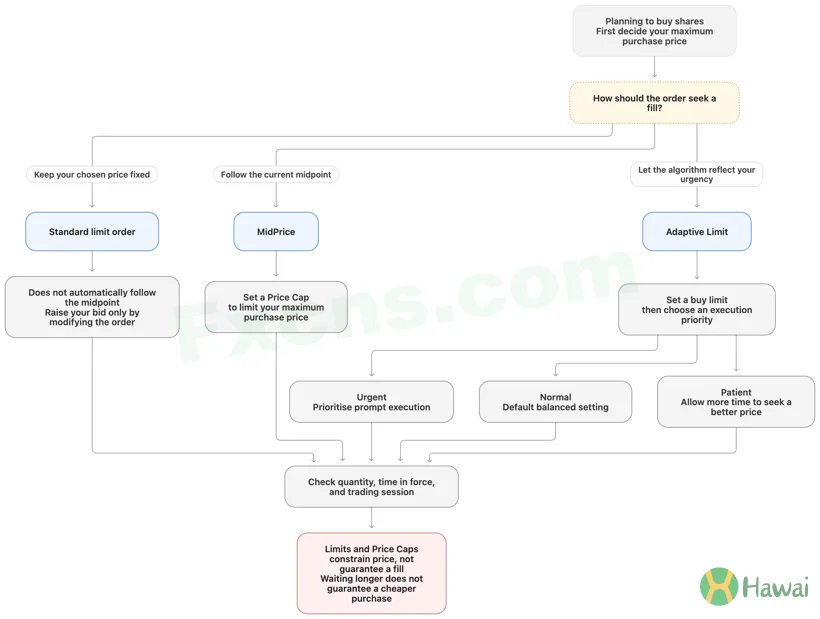
“I will pay only $100.05 and do not want to chase the market”
A standard $100.05 limit order expresses that requirement.
If the shares rise without a fill, that may simply be the result of sticking to your price, not an order problem.
There is no need to let an algorithm raise your bid just to reduce manual adjustments.
“I want to follow the latest midpoint, but will pay no more than $100.10”
Consider MidPrice with a $100.10 Price Cap.
It seeks opportunities around the changing midpoint while retaining your maximum purchase price. You must accept a partial fill or no fill at all.
“I can accept up to $100.10 and want the algorithm to reflect my urgency”
Consider Adaptive Limit at $100.10, then choose Urgent, Normal, or Patient.
If you are not especially rushed, start by understanding the default Normal setting. Consider Urgent if prompt execution matters more, or Patient if you are willing to wait for price opportunities.
However, retaining a $100.10 limit means you cannot demand an immediate full fill when the only ask is $100.20 and no other suitable seller is available.
Controlling your maximum purchase price means accepting that you might not buy. Relaxing the price does not guarantee an immediate full fill either.
6. Will an unfilled order carry over? Check validity and trading sessions
These examples cover purchases of whole shares of US stocks during regular trading hours.
IBKR’s Desktop MidPrice lesson states that MidPrice does not support fractional shares. A standard order supporting fractional shares does not mean MidPrice can be used in the same way.
Time in force also determines whether an order remains active the next day:
- Adaptive does not support GTC, or Good-Til-Canceled. In the daytime scenario discussed here, any unfilled portion of a Day order expires that day rather than carrying over automatically. To keep trying, you need to place another order.
- MidPrice offers Day or GTC. Choose Day for that trading day only, or GTC to keep an unfilled order open on subsequent trading days, subject to the broker’s automatic cancellation rules.
“Keep it open for tomorrow” and “allow it to trade tonight” are different settings.
IBKR also offers overnight trading with Adaptive Limit. For overnight use, select the order and eligible session under that arrangement. Do not simply copy daytime settings or assume Adaptive Market and MidPrice work the same way.
Before confirming an order, check at least:
- How many shares you want to buy;
- Whether it is a standard order, Adaptive, or MidPrice;
- Whether the maximum purchase price is explicitly limited;
- Which execution priority is selected for Adaptive;
- When the order expires and which trading sessions it can use.
7. Did a few cents of price improvement actually save money?
Suppose the original quote is still a $100 bid and $100.10 ask.
Buying all 100 shares at $100.05 costs $5 less than buying at the $100.10 quote. But if only 40 shares fill, the difference for that portion is:
($100.10 − $100.05) × 40 = $2.
The remaining 60 shares have not been bought, so you cannot count them as savings.
If you later raise your bid and buy the remaining 60 shares at a higher price, combine both fills to calculate the average purchase price, then include costs.
To assess an execution, record four things:
- The bid and ask when you submitted the order;
- Your limit or Price Cap, and execution priority;
- The actual quantity filled, average execution price, and costs;
- Whether you abandoned the unfilled portion, kept waiting, or raised your price to buy.
That helps show whether the algorithm reduced your cost, or whether waiting for a better price ultimately led you to pay more.
Likewise, no fill does not necessarily mean a poor choice. If $100.10 was your maximum acceptable price, an unfilled order after a rally simply respected your instruction.
First decide how much you will pay, then whether to follow the midpoint and how long you are willing to wait. Those answers tell you whether a standard limit order, Adaptive, or MidPrice fits your requirement.